33 scheduled jobs, and not one of them consumed a queue

Give every state in your workflow a named consumer on a schedule. That is the first rule I hold for an agent-run software factory, and it is the first of four I tightened in September. The short answer is that agents are very good at creating work, and nothing gets finished unless you schedule the thing that finishes it.
This is the first of four posts on workflow designs I ran in my own factory in September and then eliminated, with the measurements from before and after. I run a fleet of agents that plan, implement, review and deploy across a couple of dozen repositories, and I audit the machinery that drives them the same way I would audit a client's pipeline. When I audited the schedule, I counted 33 scheduled jobs, and not one of them consumed a queue. Plenty of them produced work, and one scanner had filed 28 issues in 10 days while zero of them closed.
What does a workflow need before it moves anything?
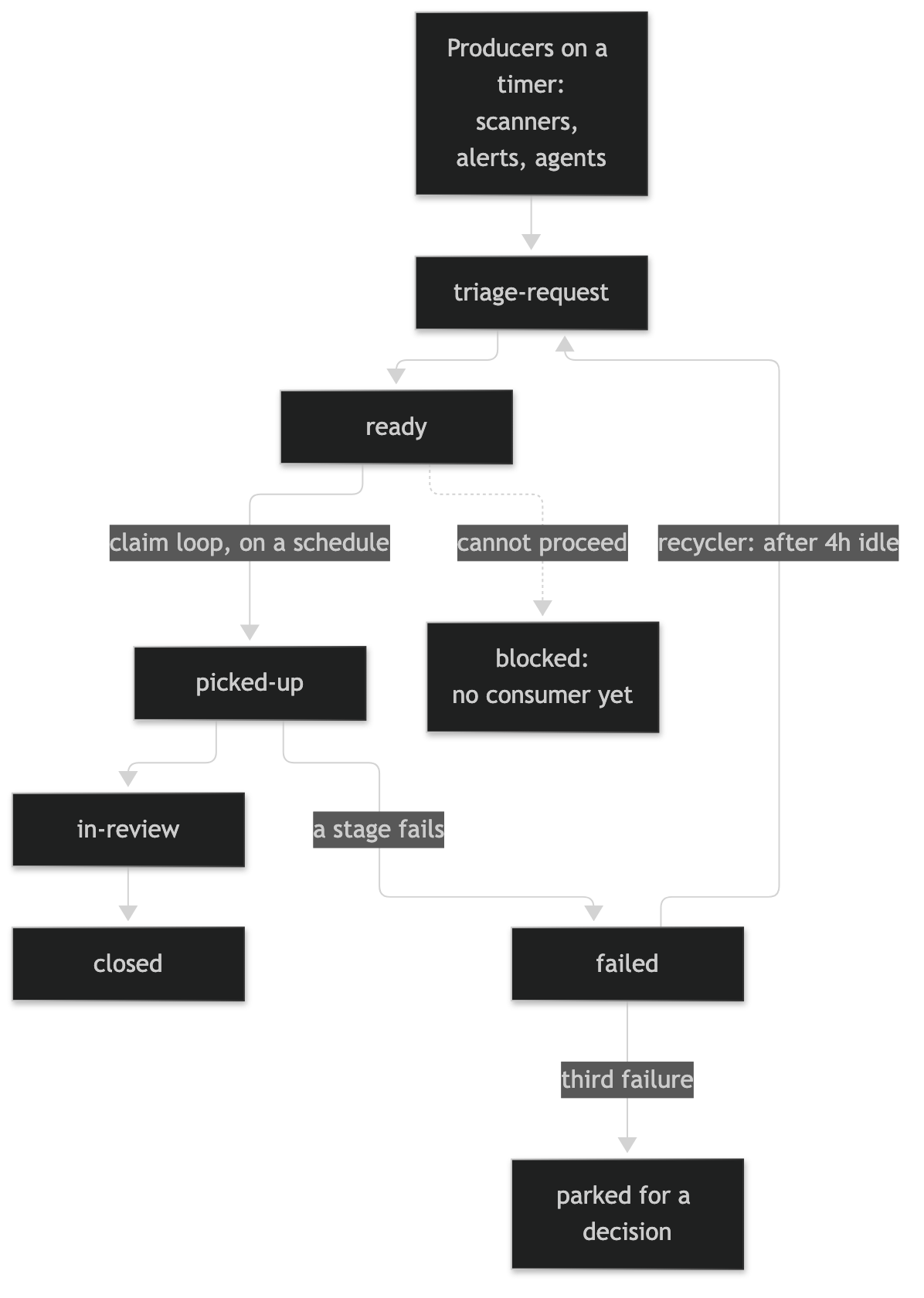
A workflow is a set of states, and work sits in a state until something takes it out. So for each state I write down five things before an agent ever touches it: which field routes the work, which job consumes it, how often that job runs, where the work goes next, and how long it can sit before a person hears about it.
Here is a trimmed example of what that looks like for two states in my tracker:
state: ready
  routed_by: assignee            # one field routes; a name in a comment routes nothing
  consumer: dev-claim-loop       # the scheduled job that empties this state
  cadence: every 15 minutes
  exits_to: picked-up | blocked
  max_age: 7d                    # older than this, a person hears about it

state: failed/implement
  routed_by: assignee
  consumer: failed-recycler
  cadence: hourly
  exits_to: triage-request after 4h idle
  on_third_failure: park for a decision
If you cannot fill in the consumer line for a state, you do not have a workflow yet, you have a list. Think of it like Tetris: the pieces keep dropping on a timer whether or not you clear a line, and there is only one way that game ends if you never clear one.
Which designs did I eliminate?
Three designs were standing in my factory at the start of the month, and I measured each one before I took it out.
A cap per run. The scanner was limited to five new issues per run, which sounds like backpressure and is not, because a per-run cap never reads the depth of the queue it is filling. Over five straight days with the cap set to zero, 17 ready issues sat open and exactly one had ever been consumed, so the valve was working fine and the queue was the problem. The cap I run now reads the backlog first and files nothing when the backlog is already deep.
Routing by mention. The agents were handing work to each other by naming the next agent in a comment, and a name in a comment routes nothing. When I counted, 54 of 73 open infrastructure issues were marked ready and assigned to the coordinator agent, which never writes code, so pull request throughput was never the real bottleneck. Now a worker claims an issue only when it is ready and assigned solely to that worker, and the assignee field is the only route there is.
Failure states with no reader. The fleet shipped seven "failed at this stage" labels, one per stage, and no job read any of them. That meant the work the fleet had already started was the only work nothing was trying to finish, and it still counted as healthy backlog on the dashboard. A state that nothing reads is a leak that looks like a queue. The recycler I added sends a failed issue back to triage after four hours idle, and on the third failure it parks the issue for a decision instead of retrying forever.
Did the numbers move?
I keep a daily ledger of the factory, and when I went to quote it for this post I threw most of it out. The set of repositories it watches grew from 12 to 17 during the month and several of its definitions changed, so its August rows and its September rows are not counting the same thing. Every number below is recounted straight from my forge's API instead, across the same 23 repositories on both sides.
| Over 14 days | Aug 29 – Sep 12 | Sep 16 – 30 | % change |
|---|---|---|---|
| Issues created | 401 | 1,009 | +152% |
| Issues closed | 400 | 1,055 | +164% |
| Pull requests merged | 413 | 563 | +36% |
| Open issues at the end | 124 | 133 | +7% |
Read it this way. The fleet created two and a half times as many issues in the second window, and closing kept pace with it. Pull requests merged went up 36%. The open count barely moved, and that is what a queue with a working consumer looks like when the intake more than doubles.
More than half of the new issues landed in my core infrastructure repository, where the count went from 143 to 576.
What is still open?
Blocked is the state I cannot give you a before for. Just over 70 issues carry that label today, and the label was redefined in the middle of the month, so there is no honest baseline to set it against. I also do not have a consumer for that state yet, which by my own rule makes it a list and not a workflow. Some of those issues are waiting on a permission, some on a decision from me, and some on another issue, and each kind needs its own exit before that number means anything.
The ledger is the other open item. It already stamps a definition version on every row, which is how I knew not to trust the comparison, and what it lacks is a fixed scope. A dashboard whose repository list changes halfway through the month is partly measuring itself, so it gets a pinned scope before I quote it again.
I wrote about the quieter cousin of this problem in a job that stops running is silent, and about the opposite problem, a producer with no bound at all, in 1,356 turns in fifteen minutes. A missing consumer has the same shape as both: nothing fails, nothing goes red, and the pile just gets taller.
Three checks for this week
The key takeaway: when a queue is not moving, look for the job that is supposed to empty it, by name, before you diagnose what is in it.
- List every scheduled job you own and mark each one producer or consumer. If the consumer column is empty, you have found your backlog.
- Pick one state in your tracker and name the job that reads it. "A person, eventually" is not a job, and you already know how that one ends.
- Check what your intake cap actually reads. A cap that counts items per run is a speed limit, and a cap that reads queue depth is backpressure. You want the second one.
Next time I will cover the state that lands on my own desk, which is the work an agent hands back to a human. I audited that pile too, and four times out of five the agent did not need me. If you have built the consumer half of a workflow like this and found a better trigger than a timer, I would love to hear how you did it. As always, I'm here to help!