My blog is 82% bots


A few weeks ago I stopped trusting my own traffic graphs. The edge dashboard told me one story — steady visitors, healthy numbers, nothing alarming. So I built a second view that reads the origin's own access logs instead of the edge's summary, and the story fell apart. When I split the traffic by who was actually making the requests, roughly 82% of it was automated. Scanners, scrapers, and probes. The humans were the minority on my own blog.
Here's the good news up front, because that number sounds worse than it turned out to be: once you can see the bots accurately, you can do something about them. I did. Let me walk you through how I measured it, what I found crawling around in there, and the layered defense I put up — most of which you can copy.
Why your traffic numbers are probably lying to you
Most of us read traffic from whatever the CDN or edge provider hands back. That's convenient, and it's also not origin truth. The edge has its own idea of what a "bot" is, it's tuned to sell you on how much it blocked, and it can't classify the actors the way you'd classify them if you had the raw requests in front of you.
I wanted the raw requests. My blog runs Ghost behind a tunnel, which introduces the first gotcha: at the origin, every request appears to come from the same internal proxy address. The real visitor IP isn't the connecting IP — it's tucked into a forwarded header. If you classify on the connecting IP, congratulations, you've decided 100% of your traffic comes from one machine. You have to resolve the real client from the header first, and then the picture gets honest.
So I shipped the reverse proxy's access logs into a log store and built a dashboard on top of them — a handful of panels that bucket every request into human, search engine, AI/LLM crawler, SEO tool, or scanner, per site. No SaaS, no black box. Just my logs, my rules for what counts as what. That's the part I'd push you toward: the value isn't the fancy dashboard, it's that you own the classification logic, so when a number looks weird you can go read the actual requests behind it.
What was actually knocking on the door
The breakdown, once I could see it: about 82% automated, roughly 864 human sessions, and around 88 AI/LLM crawlers over the window I looked at. The AI crawlers I mostly don't mind — that's the new SEO, and I'll take it. The 82% is the interesting part, and some of it is almost charming in how lazy it is.
- A single
Wget/1.25.0client hammering away at about 6,180 requests in 24 hours. Not subtle. - A user-agent string that spelled it
Mozlila— a bot faking "Mozilla" and misspelling the fake. Trust me on this one: if your attackers can't spell the browser they're pretending to be, you can afford to be aggressive with them. - Named audit scanners and generic HTTP clients — the
TLM-Audit-Scanner,pathscan, plainGo-http-client— walking the site looking for something to exploit.
The most telling signal wasn't a user-agent at all. It was what they asked for. My blog runs Ghost. So why is everyone requesting /wp-login.php, /xmlrpc.php, /.env, /.git, and /phpmyadmin? Those are WordPress and credential-leak paths that a Ghost site never serves. A human never types those. A real search crawler never asks for them. They're a perfect tell — a request for one of those paths is a confession.
Turning the tell into a trap
That confession is the hook for the whole defense, so let's dig into it. I set the blog up as a funnel, and each layer does one job.
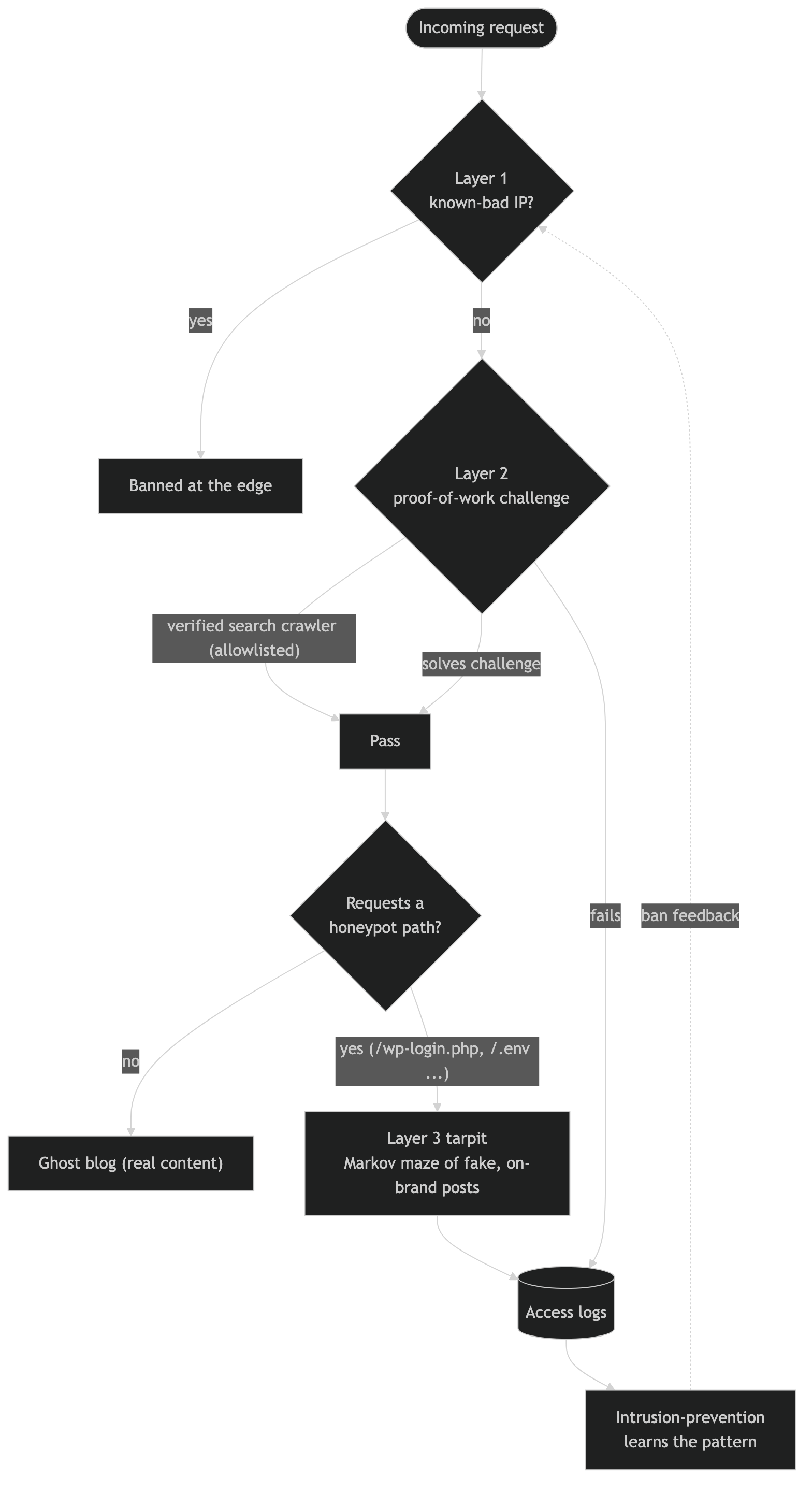
Layer one is an intrusion-prevention system that parses those same access logs, subscribes to a community blocklist, and drives a plugin at the proxy to ban flagged IPs across the whole site. Self-hosted, auditable, no vendor holding the ban list hostage. This is the blunt instrument: known-bad IP, gone.
Layer two is a proof-of-work challenge in front of the blog. Think of it like a bouncer who makes you solve a small puzzle before you come in — trivial for a real browser, expensive at scale for a scraper firing thousands of requests. The key detail so you don't wreck your own SEO: allowlist the verified good crawlers (Google, Bing, DuckDuckGo) so they walk straight through. You want to tax the scrapers, not the search engines that send you readers.
Layer three is where it gets fun. Remember those confession paths? Requests for them get routed into a tarpit — a service whose entire job is to waste a bad bot's time. It answers slowly and hands back an endless maze of links that go nowhere. In my logs I can watch a probe for /wp-admin take 20 seconds to resolve, /.env take 31, /xmlrpc.php take 12. Every one of those seconds is a second the scraper isn't spending on someone else.
I'll admit I fumbled the tool choice here first. I reached for one popular tarpit, went to read its docs, and found the author deliberately poisons his own site against AI scrapers so thoroughly that I couldn't get a clean read of the documentation to deploy it. Respect the commitment. I pivoted to a different engine and moved on.
Feeding the scrapers a fake version of me
Here's the part I'm quietly proud of. A tarpit that serves obvious garbage gets fingerprinted and skipped. So instead of random noise, I trained the maze on a Markov model built from about 3.4MB of my own published writing. Now the scrapers that harvest my domain get believable, on-brand, completely fake content — sentences that babble in my data-engineering voice about partitioned tables and granted access and daily backups, stitched into paragraphs I never wrote.
If someone is scraping the web to train a model or resell my content, they don't get my posts. They get a plausible hallucination of me. That's a better outcome than a 403, because a 403 tells them to try harder and the maze tells them nothing is wrong.
The layers also talk to each other. A bot that trips the tarpit or fails the challenge shows up in the logs, the intrusion-prevention layer notices the pattern, and the offending IP gets banned at layer one — so the next request from that address doesn't even reach the funnel. The trap feeds the wall.
What this actually buys you
Two things, and neither is "I blocked all the bots" — you won't, and chasing that is a treadmill. First, honest numbers. When 82% of your traffic is noise, every conversion rate, every "popular post," every engagement metric you've been reading is distorted by it. Cleaning the classification cleaned my analytics more than any tag-manager change ever did. Second, you stop subsidizing the people abusing you. Serving real pages to a scraper firing 6,000 requests a day costs you compute and bandwidth; sending it into a tarpit costs it instead.
One honest caveat before you run with this: the granular numbers here come from my own traffic capture over a single window, and I'd re-check them against the live dashboard before I quoted them in a boardroom. The shape of the finding is rock-solid; the second decimal place isn't the point.
If you run your own site, go build the origin-truth view before you build anything else — you can't defend against traffic you can't see accurately. And if you've found a cleaner way to classify actors from raw logs, or a tarpit engine you like better, I'd genuinely love to hear it. As always, I'm here to help!